

Elsa
Even Lift Saturation Applicator
ELSA is a hair clip timer for hair color processing times. It allows the stylist to easily keep track of hair processing time without worrying about keeping track of a timer. Simply place the clip somewhere on the client’s head and set the timer. Once the timer runs out, the lights will flash and an alarm goes off. ELSA prevents hair damage from overexposure of hair color chemicals.
Project Guidelines
Objectives: Design and fabricate a functioning timer for a specific purpose. Write software for sensing, actuation, and displays.
Duration: Started 03/31/22, completed 05/03/22
Skills: Arduino, prototyping with a breadboard, rapid ideation, Fusion360, Keyshot 10
Ideation
Many of my early ideas were centered around tasks that need timing in the home (cooking, cleaning, etc). Before each sketch, I identified the input and output for the timer.


Concept Identification

Changed the form of the clip from a circle to a traditional clip shape.

Breadboard Model
The timer and alarm were coded using Arduino. The code was developed from a starter code, with elements such as the alarm song and neopixel colors added.
Integrated Model
After the code was completed, the integrated model was created. This involved thinking about how the electronic components are enclosed within a structure so that the user properly interacts with the timer and its signifiers.


How to Use

1. Hairdresser opens the clip and places it on the client’s head (preferably near crown of head)

4. The white light indicates the length of the timer.

7. When the timer is done, the lights will flash and an alarm will sound.
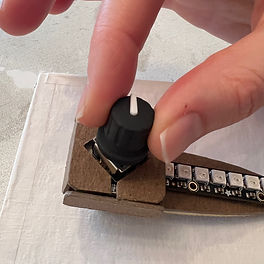
2. Twist the rotary encoder to set the time.

5. Multicolored lights indicate that the timer has started.

3. To start the timer, press down on the rotary encoder.

6. Lights dim sequentially as the timer runs out.

8. To stop the timer, press down on the rotary encoder.


